Attorney–client privilege. For confidential client communication.
Firm-led invitations. Confidential reporting. Built for legal advice.
MyCaseCare puts the principles of attorney-client privilege at the heart of your client workflow—with your firm’s instruction, authorized legal-team access, and an explicit purpose of legal advice.
ABA Model Rule 1.6 requires reasonable efforts to protect client information from unauthorized access or disclosure. Alongside that confidentiality duty, privileged legal communications rest on three foundations: the client–counsel relationship, a confidential exchange, and legal advice.
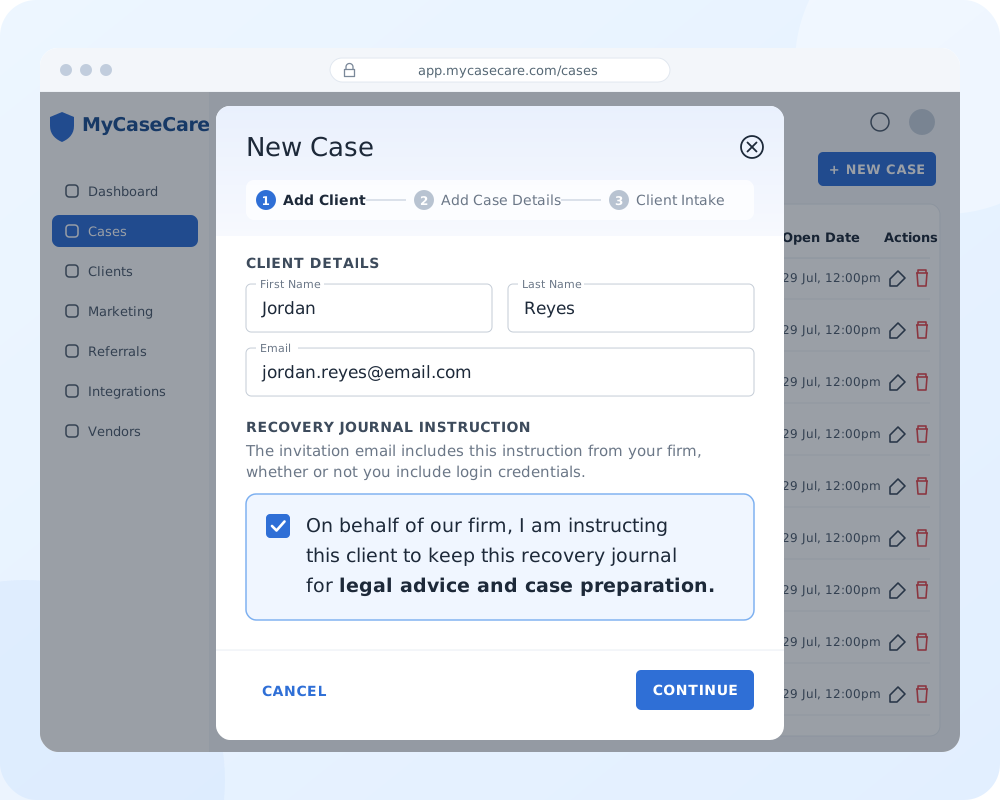
WEB PORTAL Your firm’s instruction, made explicit.
01 / THE RELATIONSHIP
Client and Counsel
A legal relationship comes first.
The attorney–client relationship gives the communication its legal context. Your firm acts as counsel, and your client shares information with you in that professional capacity.
In MCC, attorney-directed reporting keeps that relationship at the center of the exchange: the client is communicating with your firm about the case you are handling.
02 / CONFIDENTIALITY
Shared in Confidence
Confidentiality is a shared expectation.
Privileged communications are intended to stay confidential. Your client must understand that they are reporting to counsel in confidence, and your firm must handle those exchanges consistently with that expectation.
MCC frames client reporting as a private exchange for your legal team, supporting candid communication within the legal relationship.
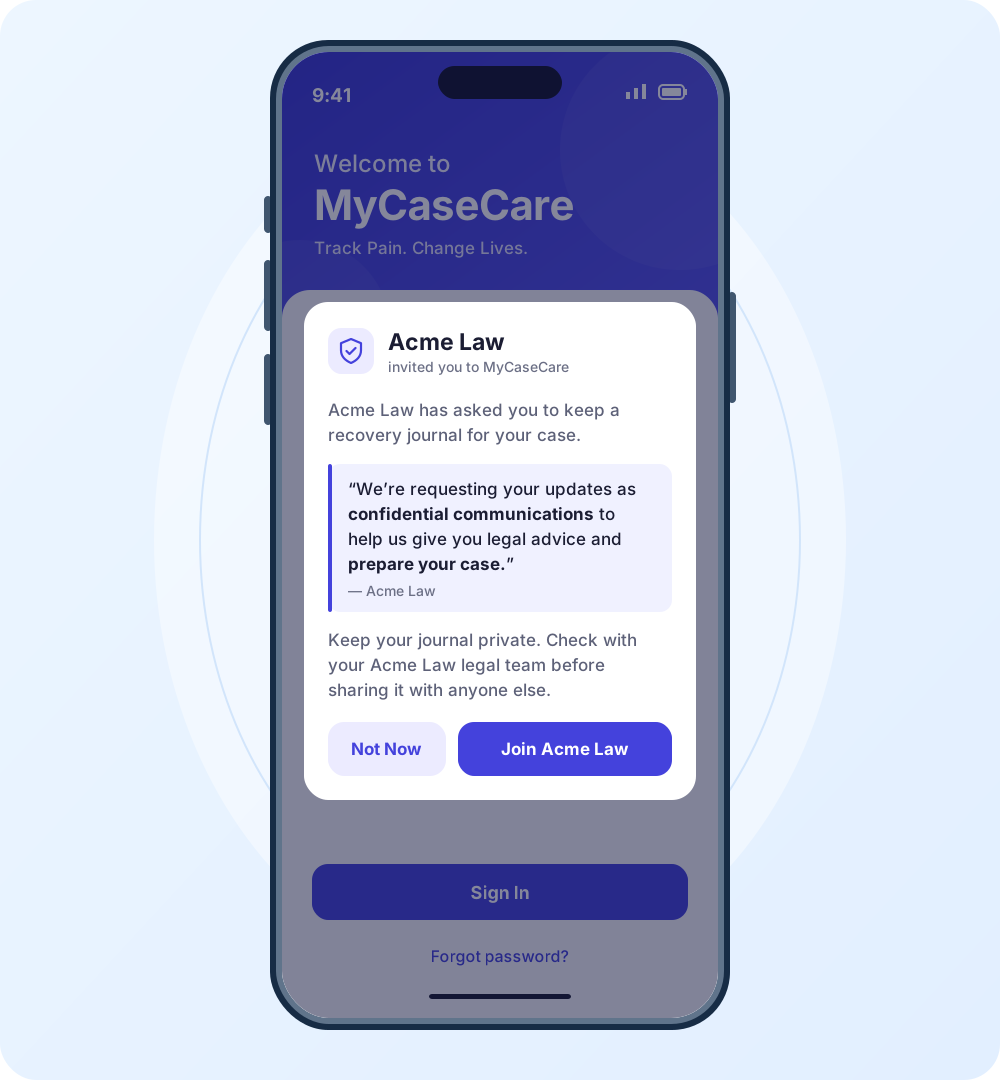
MOBILE APP The confidential purpose, shared with your client.
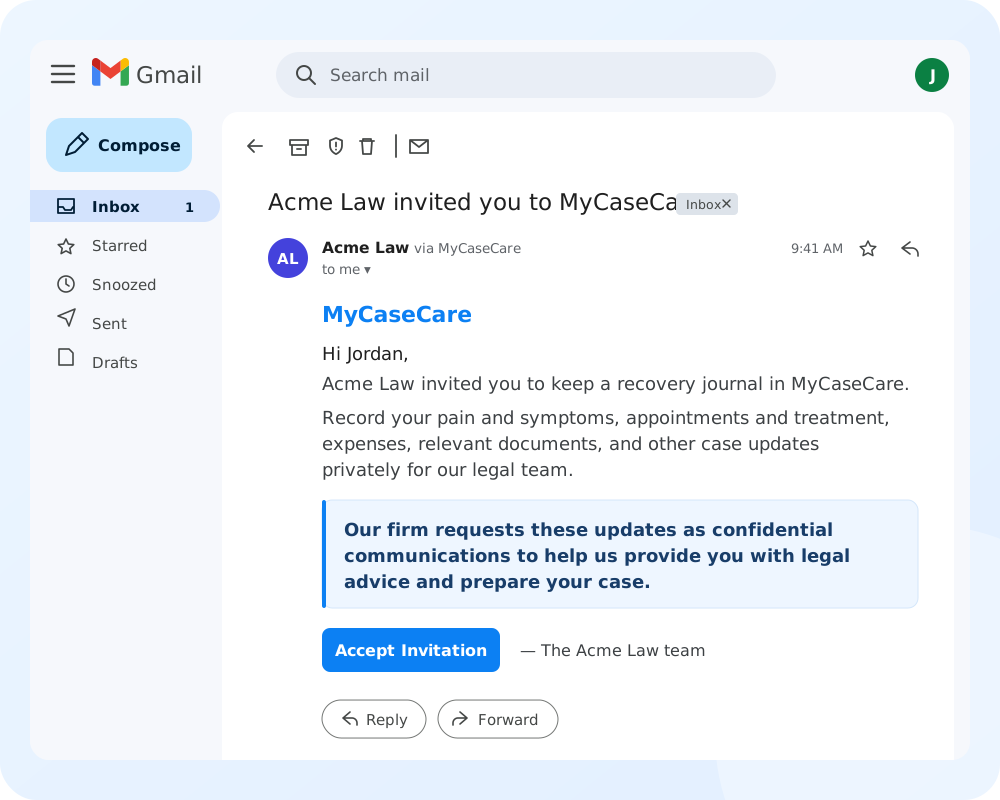
INVITATION EMAIL Your request, expressly for legal advice.
03 / THE LEGAL PURPOSE
For Legal Advice
The purpose of the exchange matters.
Privilege protects communications made to seek or provide legal advice. That includes information your client gives you so you can understand their circumstances and advise them on the case.
MCC’s attorney-directed updates carry that express purpose: helping your firm provide legal advice and prepare the case.
PURPOSE-BUILT FOR YOUR PRACTICE
Give privileged communication a dedicated home.
Email, SMS, and calls carry legal conversations. MCC adds the structure your firm needs: explicit instructions, controlled access, and organized case reporting.
EVERYDAY CHANNELS
Email, SMS & phone calls
General communication. More work for your team.
ENCRYPTIONVaries by service and settings
Protection depends on the channel, provider, and configuration.
PURPOSEGeneral-purpose communication
Your firm adds the legal context to each conversation.
LEGAL INSTRUCTIONSManually communicated
Your team explains and documents the request for confidential updates.
CASE REPORTINGManually assembled
Messages, attachments, and call notes need to be gathered into the case record.
EARLIER CLIENT HISTORYManually separated
Your team identifies which records predate the client’s connection to your firm.
BUILT FOR LEGAL TEAMS
MyCaseCare
Everyday client communication, automated.
ENCRYPTIONEncrypted connections
HTTPS/TLS protects connections to the MCC web portal and API.
PURPOSEBuilt for legal reporting
Client updates are requested privately for your legal team and legal advice.
LEGAL INSTRUCTIONSAutomatically communicated
Your request for confidential updates is included in every client invitation.
CASE REPORTINGAutomatically assembled
Client entries are organized into the case record, ready to export as reports.
EARLIER CLIENT HISTORYAutomatically separated
MCC records when the client joins your firm, so exports split into before and after.
PRIVILEGE, CONFIDENTIALITY & YOUR FIRM
Security & Access FAQs
How does attorney–client privilege work in MCC?
Privilege protects confidential communications between your firm and its clients for legal advice. MCC makes that purpose explicit in your invitation and client reporting. The attorney–client relationship, confidentiality, and legal purpose form the foundation of the protection.
Who can invite a client to MyCaseCare?
You or authorized members of your firm send the invitation. Your firm establishes representation and handles its retainer process. Clients with an existing MCC account accept your invitation before their history is shared with your firm.
Who can see the data clients enter?
Your clients and authorized members of your firm access case information according to their permissions. Listing a doctor or insurer in a case does not grant them account access. Firm access follows the client relationship established in MCC.
MCC and its service providers process information to operate the service. Connected integrations and authorized sharing may also transfer records. See our Privacy Policy.